Contributing to FINOS
There are several ways you can contribute to our existing projects and SIGs, and FINOS Members can propose new projects for contribution. Take a look at the diagram below for an overall picture of how contributions flow into FINOS:
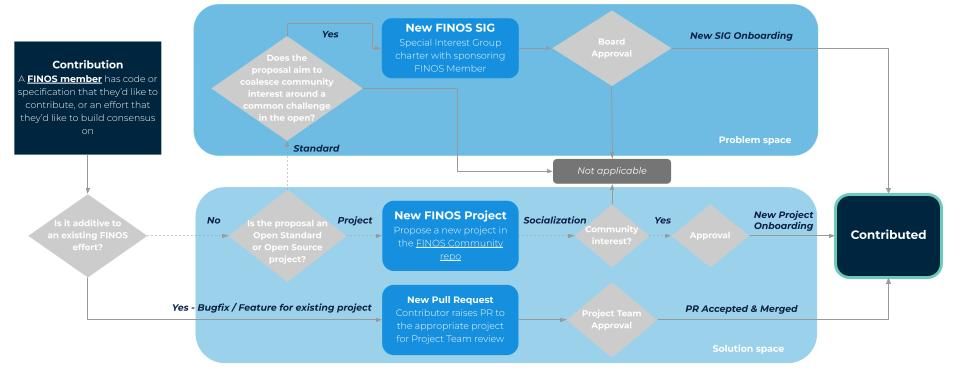
Contribution of use cases and ideas to a Special Interest Group (SIG)
If you are looking to contribute a use case or idea, start by searching if there already is a special interest groups in that area. SIGs are meant to be arenas for like minded professionals to identify common challenges, pain points and opportunities to then be solved collaboratively in the open.
Contribution to an existing FINOS project
The easiest way to engage is to contribute code, documentation, test cases, requirements, issues and pull requests, etc. to projects that are currently within the Foundation.
Before contributing to a project, community members are encouraged to familiarize themselves with a project by doing any or all of the following:
- Engage with the project community via mailing list/slack/github
- Review the project specific roadmap, area of focus, typically contained in a project Readme.md.
- Review good first issue/help wanted issues in the FINOS GitHub organization
NOTE: Forms of contribution that require a contributor to make git commits, and in turn, request those to be merged via pull requests, must comply with the Contribution Requirements in place within FINOS.
Contribution of a new FINOS project or SIG
FINOS Membership requirement
While everyone can contribute to existing projects, only FINOS Members can contribute new projects to FINOS. This ensures sustainability of our ecosystem. If you are not a FINOS Member, consider:
- Inviting a FINOS Member to be a maintainer of your project and submit on your behalf. You can reach out to our community via our community@finos.org mailing list to solicit interest.
- Consider becoming a FINOS Corporate Member to contribute to the sustainability of the ecosystem
OPTIONAL: FINOS Platinum Members can also request a so called Forming stage. If you are a member and want to explore project formation, please reach out to FINOS Member Success.
Pre-Work: Contribution Fitness
First off, you want to evaluate whether the contribution is suitable for a Foundation-hosted open source project, in terms of long term expectations and desire to build a diverse Community of adopters and contributors.
Projects contributed to the Foundation generally start in Labs stage, which sets out a set of criteria and maintenance expectations. Contributors are encouraged to evaluate the checklist and ensure they are willing to achieve those criteria before, during and after contribution.
For more mature projects, at the time of contribution contributors will have an option to evidence compliance with later stages and request the Technical Oversight Committee to award Incubating or Graduated stage.
Step 1: Submit a contribution proposal
By default, a new software project contribution enters FINOS at the Labs stage. See Project lifecycle for how stages work. Contributors may instead ask the Technical Oversight Committee to recognize Incubating or Graduated stage when the contribution already meets the criteria for that stage.
Draft a proposal to be reviewed by the FINOS team. Please use the available templates for:
This will create a new issue on the FINOS Community Repository and kick off the process. The proposal is meant to cover the following:
- Business problem: the business problem that the proposed contribution solves.
- Proposed solution: how the proposed contribution solves that business problem. For software projects, include a detailed description of the software and its functionality.
- Tentative roadmap: a description of the short and medium term goals and phases of the project, and what success looks like for this project
- Current state: a summary of the contribution's history and status. Include information about the contribution's maturity and roadmap.
- Existing materials: links to and descriptions of any existing project materials (e.g. GitHub repositories). If any materials are currently private, please describe them in detail. The FINOS team will reach out to request access to private materials in order to evaluate them.
- Development team: current contributors, including full name, affiliation, work email address, and GitHub.com username where available.
- Contributor commitment: describe the resources you'll commit to supporting the contribution should it be accepted by the Foundation, in line with the Lifecycle Stage you are applying for. This might include developer time (in FTEs), marketing support, Foundation membership, etc.
The technical charter sets forth the mission, goals, and responsibilities of the project. When a software project contribution is approved, FINOS publishes it at the root of the project GitHub repository as technical-charter.pdf. The information you supply in your proposal will match what will appear in that document.
To maximize the chances of being accepted, you should provide evidence in your submission of compliance with the criteria and commitment to fulfill ongoing maintenance requirement listed in the Project Lifecycle.
TIP: To review previous contribution proposals (to see examples, or to see if someone has contributed something similar, etc.) you can search our Github contribution issues history.
Step 2: Socialization
Once the issue is raised, maintainers should email directly the community@finos.org (subscribe here) and TOC to outline your contribution idea and link to the previously created contribution issue). A simple note pointing to the Github contribution issue and encouraging the FINOS Community and Members to post their support / feedback on the issue will go a long way here.
Below a template provided for you as a starting point to socialize your proposed contribution.
Subject: New proposed contribution to FINOS: <insert Project Name> - we need your feedback!

Body:

Dear FINOS Community,

I am excited to announce that we have just submitted the contribution of <insert Project Name> <insert project github URL if already open source>. You can find all the details of the contribution at <insert github contribution issue URL>.

<insert brief project description and example use cases>

As the TOC gears up to review the contribution we would love to see your feedback and questions on the issue to express your interest in adopting or even better contributing to the project. Even a thumbs up would be very much appreciated.

Also please don't hesitate to reach out to me at <insert mailing list / slack / email> if you have any questions.

Thanks in advance for your consideration!

<insert contributor name(s)>
Note: while everyone is welcome to contribute to existing projects, only FINOS Members can propose new projects. If you are not a Member this step is particularly important to identify a Member who could become a sponsor for your project, by being listed in the initial maintainers.
Step 3: Approval
Once the FINOS team has validated the contribution proposal for completeness, the contribution must go through an approval phase, for alignment with the scope and objectives of the Foundation, viability, perceived interest within the FINOS community.
Particularly:
- Special Interest Groups and Open Standards, the Governing Board will review and approve the contributions either via an email vote or at the next available meeting.
- For software project contributions, the Technical Oversight Committee (TOC) will review and approve the contributions.
Step 4: IP review & Transfer of Contributions
Once a contribution is approved, the Foundation will perform an audit to ensure the contribution is consistent with the FINOS contribution requirements. The main areas covered are:
Trademark
-
If the chosen project name and existing logo are found to be risky choices from a trademark standpoint (e.g. they clash with existing marks), the project will be requested to select a new name that does not conflict with any existing marks
-
If the contributor holds a trademark or the project name has been previously used in the public domain (therefore potentially granting the contributor common law trademark rights, the contributor will be requested to transfer the project trademark to the Linux Foundation by completing a contribution agreement. This will allow FINOS to neutrally steward the project consistently with our Trademark Guidelines.
Intellectual property
The project will be required to:
-
Have appropriate DCO or CLA coverage for each maintainer
-
Comply with third-party licenses and the FINOS acceptable Apache-compatible license policy.
-
Comply with FINOS notice requirements for IP notices, contributor attribution, etc - this can happen right after the contribution (see incubating criteria)
Step 5: Transfer and Review of Contribution Materials
Following successful IP and trademark compliance, the FINOS infrastructure team will work with the contributing organization to transfer existing code and other materials to the project's collaboration infrastructure (e.g. its GitHub repository, project web site, and/or wiki space) and set for permissions for the initial list of maintainers. This can happen by giving access to an existing DVCS repository to the FINOS team or sending the FINOS team an archive containing the code to be contributed. See Code transfer options.
It's during this step as well that code validation and scanning of the code base will be performed, any build processes set up and configured, and the various components documented in the Project Tooling section configured and set up for the project, at which point the rest of the Foundation's infrastructure will be available to the project contributors moving forward to use to develop, test and release the project.
Step 6: Contribution Announcements
Once the transfer and review is complete, it's time to announce the contribution and garner attention and additional contributions from the FINOS community. In order to do so:
We encourage project leads to email announce@finos.org - see a couple of good examples or use the template below and don't be shy!
Subject: New Project announcement: <insert Project Name> now Open Source in FINOS

Body:

Dear FINOS Community,

I am excited to announce that <insert Project Name> was successfully contributed to FINOS and hosted at <insert Github URL>.

<insert brief project description and example use cases>

The most current release is <insert release version>, available for download at <insert download URL or dependency coordinates for different build systems>. Documentation is available at <insert doc site URL> and you can reach out to the project team at <insert email list, chat URL, etc>.

Your feedback, issues, and contributions are more than welcome. See <link to contribution information, e.g. CONTRIBUTING.md> for more information on how to contribute and here's a few area where we could use help <insert URL of issues tagged with "good first issue" or "help wanted">

Thanks to the FINOS Community for a warm welcome!

<insert contributor name(s)>
Besides the technical announcement on list, the FINOS team will recommend to coordinate marketing announcements including:
- Blog posts to announce the contribution on finos.org/blog - you can contact our Marketing to propose an article
- Social media announcements - you can reach out to marketing@finos.org to ask for our support in promoting the contribution
- For substantial contributions, especially of those with multiple contributing orgs, FINOS may choose to support contribution announcement with a press release. Contact marketing@finos.org if you think a press release is warranted and co-promotion from your organization.
Code transfer options
There are several ways in which contributors can transfer their project's code to the FINOS infrastructure team during contribution:
GitHub.com repository (recommended)
Use GitHub's transfer ownership capability to move it over to the project's GitHub organization. To do this, the contributor will need to temporarily add one of the project's GitHub organization owners (e.g. the project maintainer) as an admin on the source repository, so that they can initiate the transfer. Once the code has been transfered, the contributor will be able (and is encouraged) to remove the project's GitHub organization owner from the repository.
FINOS recommends this approach as it has the unique benefit of preserving the full commit & pull request histories, the project's issue list, wiki and GitHub pages, and more.
Some important notes:
- When transferring a repository, its issues, wiki, stars, and watchers are also transferred (read more details about repository transfers)
- When transferring a private repository, all forks will be disabled, until marked as public; they will also be disconnected from the upstream repository, therefore it is strongly advised to push all changes to an upstream branch, before transferring the code
GitHub.com repository where it is not possible to temporarily configure someone else as an admin
Perform a double transfer:
- Transfer ownership of the repository to a personal ("user") account on GitHub (see the GitHub documentation for details)
- Follow the steps described above for transferring a GitHub.com repository to the project
GitHub Enterprise repository
Perform a copy, transfer, and freeze:
- Copy the repository into a personal ("user") account on GitHub (this StackOverflow post describes how to accomplish this)
- Follow the steps described above for transferring a GitHub.com repository to the project
- Delete or freeze (e.g. disable access, make read-only, etc.) the repository in your GitHub Enterprise installation, to prevent accidental modifications to the wrong repository.
Other Source Code Management (SCM) repository
Perform an import, transfer, and freeze:
- Use the GitHub importer to import the repository into a personal ("user") account on GitHub (see the GitHub documentation for details)
- Follow the steps described above for transferring a GitHub.com repository to the project
- Delete or freeze (e.g. disable access, make read-only, etc.) the repository in your SCM installation, to prevent accidental modifications to the wrong repository.
Source code snapshot
Snapshotting the code and providing it to the FINOS Infra team in an archive file (.zip, .tar.gz, etc.) can also work. This is the recommended approach if you wish to truncate the commit history prior to contribution.
Do-It-Yourself (DIY)
If you wish to populate your repository yourself, the FINOS Infra team should create an empty repository in the project's GitHub organization (as described above), and then configure the contributing team as owners and committers with appropriate access.
Have questions?
If you'd like help, don't hesitate to reach out by email to help@finos.org or ask the wider community with a note to community@finos.org.